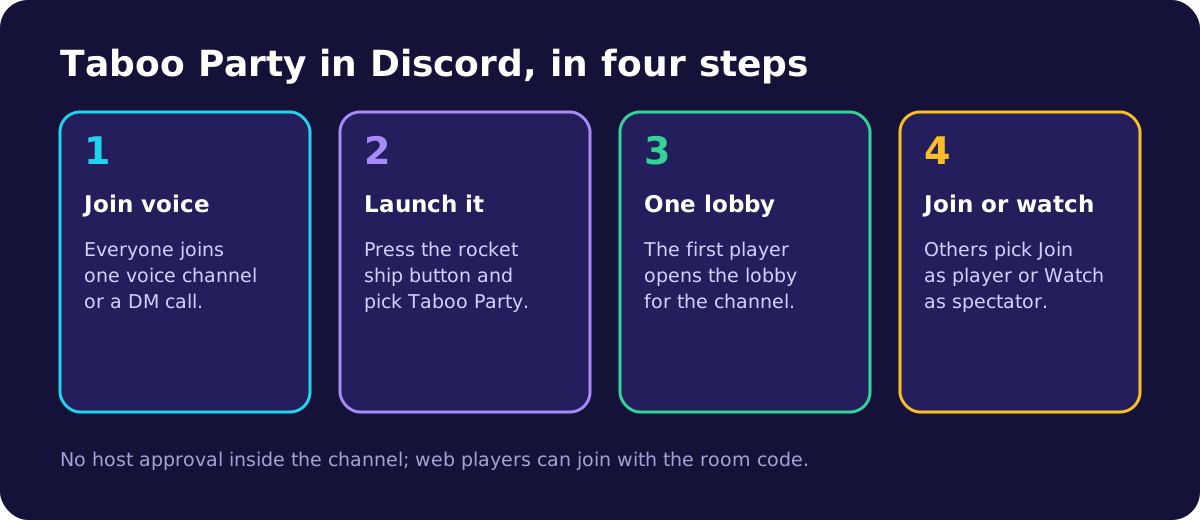
How do you start Taboo Party in a Discord voice channel?
You start the Activity from inside a voice call. Discord shows a rocket ship button next to the camera and screen share buttons, and it opens the list of Activities you can launch. The same button works in a server voice channel and in a direct message call.
- Join the voice channel where your group is hanging out.
- Press the rocket ship button in the voice controls to open the Activities list.
- Pick Taboo Party. If it is not on the first screen, search for it by name.
- The first time, Discord asks you to let Taboo Party see your Discord account. Accepting signs you in, so you do not need a separate password.
- Wait for the loading card. It names each step, such as Authenticating with Discord, so you can see where it is.
- You land on a screen titled Getting the party ready, which opens the lobby for the channel.
Anyone in the call can start the Activity, unless the server's moderators have limited who may use Activities in that channel. If the rocket ship button shows no Activities, ask a moderator to check the channel's permissions.
Discord runs Activities on its desktop app, in the browser and on phones, so players can mix devices in one game. A laptop or desktop is still the most comfortable seat for describing, because the whole board fits on screen with room to spare.
What does everyone else see?
Everyone else in the voice channel sees that an Activity is running and can join it from the channel. On desktop, hovering over the voice channel shows a Join Activity option, and pressing it opens the game in their own Discord window.
Each voice channel gets one lobby. The first person who opens the Activity creates it, as a casual room with the Standard word pack. Everyone who joins later from that channel lands in the same room, so nobody has to share a room code inside Discord.
A joining player first sees the message that the party was found, with two buttons: Join as player and Watch as spectator. In a game with two or three teams, Join as player then lists the teams with how many players each one has, and you pick yours.
Under the buttons, the screen says: "Anyone in this voice channel can join the table or watch without host approval." That holds even after the game has started, which is the biggest practical difference from the website, where a host approves late arrivals.
The Invite people button opens Discord's own invite picker, so you can call in friends who are online but not in the channel yet.
How do rooms, teams and turns work inside Discord?
Inside Discord the game itself is unchanged. The describer sees a board of ten words, explains them out loud in the voice channel, and teammates type their guesses into the guess box. Points, near misses, bonus words, reports and votes all work the same way as on the website.
The lobby is set up a little differently. In an Activity room, every player who is not a spectator can change the settings and press Start, not just the person who opened it. Agree out loud who sets up the game, so two people are not changing the rounds at the same time.
The person who opened the Activity is the room's host for hosting purposes. A free account comes with a monthly allowance of hosted games, and a game counts against it once, when the game reaches its halfway turn. Party Pass or TabooPlus removes the limit.
Two settings are missing from the lobby in Discord: Voice taboo detection and the Guesser voice button. Both listen through the browser's microphone, which the Activity does not use, so slips are caught by the other team instead. Turn on Taboo reporting and, if your group likes to argue, Taboo voting.
For the full scoring rules, the vote thresholds and a worked turn, read how to play Taboo Party, with every rule and score explained.
Voice etiquette for a Discord game
A voice channel full of excited guessers can drown out the describer. Discord, like most call apps, lets the loudest voice win, and a single shout can cover the one clue that mattered.
- Guessers type and stay quiet. Every guess goes through the guess box anyway, so shouting it adds nothing to the score.
- The watching team mutes during the other team's turn but keeps listening, because they are the ones who report slips.
- The describer unmutes before pressing Start turn. The clock only starts when the describer presses it.
- Players in a noisy room use push to talk or headphones, so the describer is not competing with a television.
- Between turns, the channel can talk freely. The turn summary waits up to 30 seconds before the next turn, which is plenty of time to laugh about a bad clue.
The same habits help on Zoom and Google Meet, and the guide to playing Taboo on a video call covers them for calls outside Discord.
What is different from the website?
The Activity and the website talk to the same game server, so rooms, words and scoring are shared. Discord loads the game through its own proxy instead of from the website address, which changes nothing for players. The differences are in accounts, payments and the pages around the game.
- Purchases go through Discord. Coins and TabooPlus are sold with Discord's own checkout, and the store says: "Purchases are processed through Discord." Refunds for those purchases go through Discord too.
- Discord's mobile app cannot take these purchases. The game shows "Please use Discord on desktop" if you try to buy on a phone.
- There are no Google ads in the Activity, and no banner ads of any kind. Ads are switched off there before any ad code loads.
- Stats, leaderboards, friends and the how-to-play rules open as screens inside the Activity. The website footer and its page links are hidden.
- Web players can still join. The room code in the lobby header has the tooltip "Copy room code for web players", and anyone can type that code on the website to join the same room.
Your account carries over. The Activity looks for an account linked to your Discord id first, then for one with the same verified email as your Discord account. If you signed in on the website with Discord, or with Google using that same email, you get the same coins, cosmetics, stats, friends and TabooPlus in both places. Without a match, the Activity creates a new account for you.
Common problems and how to fix them
- A screen that says "Open inside Discord": the Activity address was opened in a normal browser. Launch it from a voice channel, or press Play Web Version to use the website instead.
- Loading stops with a "retrying" message: the Activity tries to connect up to 5 times on its own, waiting a little longer each time. Leave it running for a moment before you close it.
- A Connection Error screen: the retries ran out. Press Try Again first, which restarts the setup without reloading, then Reload Page if that fails.
- Stuck on "Rejoining your game": the Activity waits up to 12 seconds for the game you were in last time, then starts fresh. Since the 2026-10-10 update it no longer hangs on this screen.
- The channel lobby could not be opened: press Try again on the setup screen. If the message is about the monthly allowance of hosted games, someone else in the channel can launch the Activity and host instead.
- A friend vanished from the lobby: players who close the Activity before the game starts are removed within seconds, so the team list stays accurate. They can launch it again and rejoin.
A dropped connection during a game is different from closing the Activity. A player whose connection drops keeps their seat for 3 minutes and goes straight back into the game when they reconnect. Closing the Activity on purpose leaves the game, and launching it again offers the join screen with the same two choices.
Fixes for older problems, with dates, are listed on the Taboo Party changelog.
How do you host a Taboo game night for a Discord server?
Host a server game night by picking one voice channel per table, announcing a start time, and choosing settings that fit the headcount before people arrive. A Discord scheduled event works well for the announcement, because members get a reminder and can see which channel to join.
- Four to eight players: two teams. Six rounds of 60 seconds makes 12 turns, about 20 minutes with the summaries between turns.
- Nine to twelve players: three teams, so everyone still gets to describe. Lower the rounds to keep the game under half an hour.
- More people than that: open a second voice channel. Each channel gets its own Activity and its own lobby, so two tables can play at once.
- Latecomers and people who only want to watch can pick Watch as spectator, which keeps the teams even.
Before the first game, agree the house rules out loud: no spelling letters, no rhymes, and whether translations count. Then choose who sets up the lobby, since every player can change the settings. After the game, the results screen names an MVP, a Top guesser and a Top describer, and Play again keeps the same group together for a rematch.
For timings by group size and a printable plan for the evening, use the Taboo game night hosting checklist.
If your server wants its own in-jokes on the board, make a custom Taboo word pack for your group and pick it in the lobby.