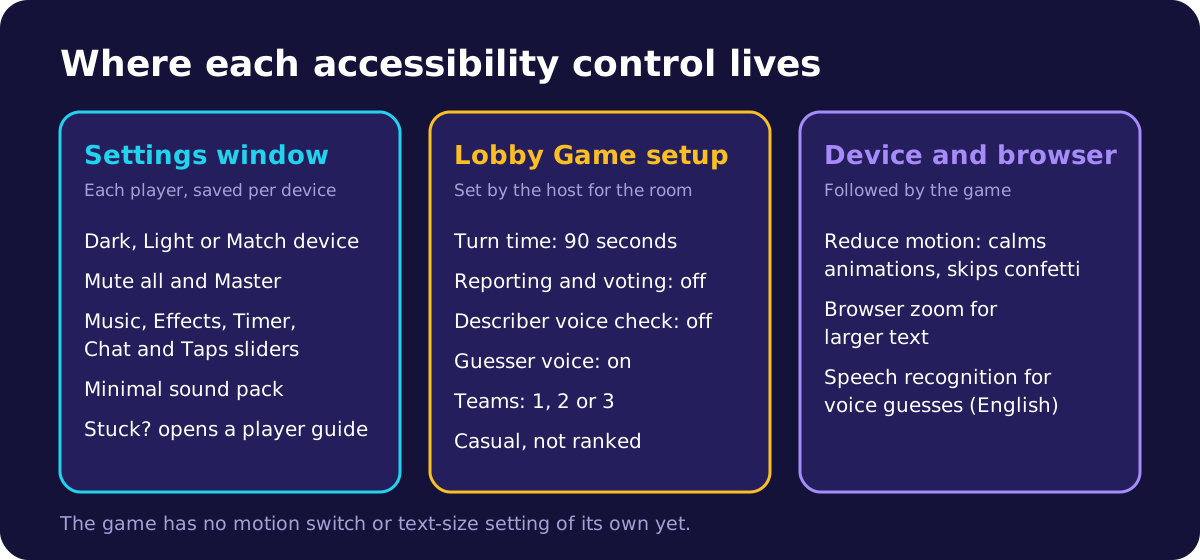
Where are the accessibility settings?
Your own settings live in one window. Press the gear button on the home screen, in the lobby or after a game, or choose Settings from the game menu. The window says "Changes apply straight away" and has two parts, Appearance and Sound.
These choices are saved on each device, not on your account. Room rules such as turn time and the voice features are set by the host in the lobby. If you lose track of what to do, the Stuck? button opens a short player guide on every important game screen.
Motion and sound
Taboo Party follows the Reduce motion setting of your device. When it is on, animations and transitions are cut to almost nothing, confetti bursts are skipped and scores jump straight to their new value instead of counting up.
The game has no motion switch of its own, so turn on Reduce motion, or Remove animations on some phones, in your device's accessibility settings.
Under Sound there is a Mute all switch and a Master slider. Below them are five separate sliders for Music, Effects, Timer, Chat and Taps, each from 0 to 100, so you can keep the sounds you rely on and drop the rest.
- Turn Timer down if the ticking clock adds pressure, or up if you use it to know time is running out.
- Taps starts at 0, so buttons stay silent unless you raise it.
- Music plays only on game screens, never on pages like this one.
There are two sound packs, each with a preview button. Signature is bright and busy. Minimal is described as "Soft clicks and ticks only", and it leaves the jingles for round ends, wins, losses and coins silent.
Text, contrast and colour
Under Appearance you can pick Dark, Light or Match device. Dark is the default, and Match device switches with your system's light or dark setting.
An automated test checks both themes. Body text must reach a contrast ratio of at least 4.5 to 1 against the main backgrounds, the WCAG level AA rule, and white labels on coloured buttons at least 3 to 1.
There is no text-size setting in the game. Use your browser's zoom or pinch to zoom instead, because the pages never block it.
Teams are blue, red and green, but the game also names them. The turn card says "TEAM 1'S TURN!" in words, and each score plate shows the team name or a short label like T1. The host can rename teams with the Edit team name button.
The board does not rely on colour alone either. A guessed word gets a tick badge, a near miss gets a half-points badge, and a confirmed taboo has a line through the word and a label. In the "Live guesses" list a correct guess has a tick and a wrong one a cross, and a screen reader hears them as "correct" and "not it".
Can you play with a keyboard or a screen reader?
Buttons, links and fields show a clear outline when they have keyboard focus. When a window opens, focus moves into it, Tab and Shift+Tab stay inside it, and closing it returns focus to the button that opened it.
Escape closes most windows. It does not close the shop, coin purchases, checkout, the word-pack editor, choosing a team or Change name. Escape inside a text field only affects the field.
Option groups such as Turn time, the theme and the sound pack take the arrow keys, and Home and End jump to the first or last option. When your team is guessing, the guess box takes focus and Enter sends one guess.
A board word you can report acts as a button, so Enter or Space reports it. The taboo vote window opens with focus on the window itself, so no vote is cast by accident.
Icon-only buttons have spoken names. A screen reader hears the role banner at the start of each turn, such as "YOU'RE DESCRIBING", the "Bonus words!" message, the "Time's up!" screen and short notices such as a reconnection.
Each score plate reads as the team name and points, with "playing now" for the team whose turn it is. The timer reads as seconds left when you move to it, but it is not announced on its own, so it never talks over the describer.
During a turn, a screen reader politely announces each correct guess as "name guessed word, +points", and each new chat message from another player as "name: message". A team-only message adds "(team)" after the name, and a GIF is announced as "sent a GIF". Your own messages, system lines and wrong guesses are not announced.
At most one announcement is made every 2 seconds, and a burst is cut to three lines plus a count of the rest, so a fast round does not flood the reader. Only what is already on your screen is announced, so a guesser never hears the describer's secret words.
Can you guess by voice instead of typing?
Typing is the main way to guess. The game ignores capital letters, spaces and punctuation, and a guess at least 85% similar to a board word earns half points. That helps anyone who misspells.
The room setting Guesser voice is on by default and adds a microphone button beside the guess box. The button starts switched off on each device. It uses the browser's speech recognition in English, and if the browser has none the button is greyed out and suggests Chrome.
The microphone is not offered for the Hindi packs or inside the Discord Activity, where guessers type.
The Describer voice check is off unless the host turns it on. It listens to the describer's microphone, in English, for the words on the board, and for any spoken word of three letters or more that is part of a board word or contains one.
A match is confirmed as a taboo at once, without a vote. That is harsh on a describer with a speech difference, a strong accent or a stammer, because a misheard word costs points. The host can switch it off in the lobby, or mid-game in the host controls, where it is called Voice taboo detection.
For near misses and hints in more detail, read the guesser guide on typing fast and using hints well.
More time and help with words
Turn time can be 30, 60 or 90 seconds in a casual room, and 60 is the default. Ranked rooms only offer 30 or 60, so play casual when someone needs longer to find words, read or type.
The clock only starts when the describer presses START TURN, so they can read the board and settle first. A player who would rather not describe this time can press Skip my turn to pass the turn to the next teammate.
Hints help a guesser who is stuck. A signed-in guesser on the playing team can buy First Letter, Reveal Length and Reveal Vowels, and on an easy word they cost 3, 6 and 9 coins. The describer cannot buy hints.
How can a host set up a room for one player's needs?
Ask the player what helps, then change these settings under Game setup in the lobby. Each setting applies to the whole room.
- Create a casual room, because ranked locks the turn times, reporting, voting and both voice settings.
- Set Turn time to 90 seconds for a player who reads, speaks or types more slowly.
- Leave Taboo reporting and Taboo voting off, as they start in casual rooms. Voting opens a 30-second vote window that cannot be closed.
- Keep Describer voice check off for any describer the browser may mishear.
- Keep Guesser voice on for a player who finds typing hard, and test their microphone before the game.
- Use smaller teams, such as three teams instead of two, so fewer voices call out at once for a player who is hard of hearing. Three teams need at least 6 players.
- Use Make describer from a player's menu on the team list to give someone a turn they missed.
On a call, captions and the call's own chat help a lot, and the guide to playing Taboo on a video call covers call apps and audio fixes.
What we don't do yet
- There is no motion switch or text-size setting inside the game, and no high-contrast theme beyond Light and Dark.
- Taboo Party has no voice chat or captions of its own. Describing happens out loud in the room or on your call.
- There is no typed-describing mode, and a describer cannot use the room chat during their own turn.
- Both voice features listen in English only and need browser speech recognition.
- Ready-made preset phrases in chat are only offered to players under 13. Everyone else types or picks emoji.
- Buttons such as the settings gear and lobby options are at least 44 pixels on phones, the size WCAG recommends at its highest level. On screens 768 pixels wide or more, some option buttons are 36 pixels.
If something here gets in your way, tell us on the contact page. Requests from players shape what gets built next.